How to Get More Local Jobs for Free: The Complete Google Business Profile Guide for Tradies

Updated: Jun 17
Right now, someone near you is Googling your trade.
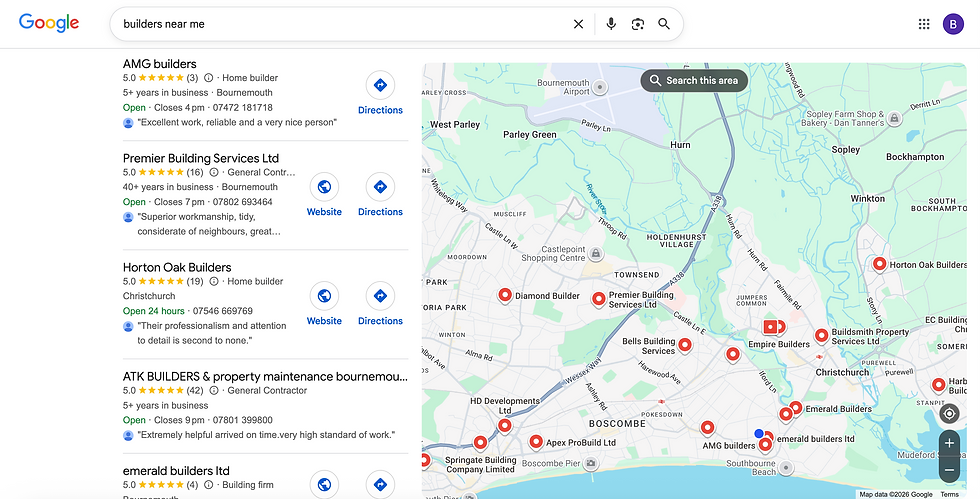
They've got a leaking pipe, a fuse board that needs replacing, a bathroom that needs fitting. They're not on Checkatrade. They're not asking around. They're doing what almost everyone does in 2026: they're typing "plumber near me" or "electrician in [my town]" into Google and they're calling the first business that looks trustworthy.
The question is whether they call you.
This guide covers everything you need to know to make sure they do.
ℹ️ Good to know
This guide is organised into 6 parts:
Let's dive in.
First, why should you care?
The problem with how most tradies find work
If you're like most tradespeople, your work comes from a mix of:
Word-of-mouth
Repeat customers
Maybe a lead platform - like Checkatrade, Rated People, or Bark
And often, that works. Until it doesn't.
Word-of-mouth is brilliant. But unpredictable. You can't turn it on when you've got a quiet week. You can't scale it. And as people move around more, change neighbourhoods, and Google things before they ask friends, its reach is getting shorter.
Repeat customers are great. But they only need you when they need you.
And the lead platforms are even more frustrating. You pay monthly whether you get work or not. Every lead gets sent to three or four other tradies. You're competing on price against blokes who'll undercut you. And the customers? Sometimes great. Sometimes time-wasters who've already booked someone else.
The result is a cycle that most tradies know all too well: a few busy months, a few quiet ones, and a constant background anxiety about where the next job is coming from.
But there is a better way. It doesn't cost anything. You already have access to it. And most of your competitors aren't using it properly.
Why Google is now your most valuable source of work
Think about the busiest, most-in-demand tradie in your area. The one who's always booked up, never advertises, seems to have more work than they can handle.
Chances are, they've got a strong Google Business Profile. And most of their competitors haven't.
💡 93% of homeowners now use Google to find and research local trades
Not directories. Not leaflets. Not by asking a mate first. Google.
When someone's boiler packs in on a Friday night, they're not asking their neighbour. They're Googling "emergency boiler repair near me" and calling whoever comes up first with decent reviews.
When someone gets recommended your name by a mate, they don't just call you. They Google you first. They check your reviews. They look at your photos. And what they see decides whether they call.
The reality is Google is now your shopfront. Your reputation board. Your first impression. And unlike Checkatrade, it's truly yours. You own the reviews. You build the reputation. Nobody can take it away from you, and nobody charges you a penny for the jobs that come through it.
The tradies winning on Google aren't necessarily the best either. They're the ones who've set up their profile properly and keep it active. This guide tells you exactly how to do that.
💡 Tip
A well-optimised profile can quietly pull in hundreds (if not thousands) of local searches a month - every one a potential customer, and you don't pay a penny for them
5 things a great Google Business Profile gets you
Before we get into the how, here's what's at stake - because the numbers are bigger than most people expect.
More visibility. A complete, optimised profile gets 7x more clicks than an incomplete one. Most tradies' profiles are incomplete.
More calls and local jobs. Optimised profiles generate at least 3.5x more calls than neglected ones - and in competitive trades like plumbing and electrical, the difference can be significantly higher.
More trust before you've said a word. Customers who find you through Google have already read your reviews, looked at your photos, and decided you're worth calling. That's a fundamentally different conversation than a cold lead from a platform.
A better kind of customer. Someone who Googles your trade, finds your profile with 50 reviews and a dozen job photos, and calls you - that person has already decided you're the one. They're not price-comparing. They chose to call because they already trust you. That changes the conversation from call to booked job.
And it grows over time. Every review you collect, every photo you add, every post you publish - they don't expire. They build on each other. A profile you actively invest in this month keeps getting you local work for years.
So, how can you build and maintain the perfect Google Business Profile?
Enter, the complete Google Business Profile setup guide for tradies
What follows is every section of your Google Business Profile, explained properly. Set this up right once, keep it active, and you'll be getting more local jobs within 30 days.
⏱ Time to complete initial setup: 3 to 4 hours.
⏱ Ongoing maintenance time: up to an hour a week.
Note: You can use a free tool - like the TradeFinch mobile app - to maintain and improve it for you in under 5 minutes a week. You stay the owner of your profile, we're only ever added as a manager, and it's genuinely free - no card, no trial.
Step One: Claim and verify your profile
Before you can do anything else, you need to either create or claim your Google Business Profile.
If you already have a profile (Google may have created one)
Google often auto-generates profiles from information scraped from directories and websites. Search your business name on Google Maps. If a profile exists, click 'Claim this business' and verify that you're the owner.
If you're starting from scratch
Go to business.google.com and sign in with a Google account. Use a dedicated Google account for your business - not your personal Gmail.

Click 'Start Now' or 'Add your business', and follow the steps. Enter your business name, select your category, and choose whether you're a service area business (most tradies) or a premises-based business (i.e. customers come to you rather than you go to them). Both can be true (known as hybrid).
Verification methods
Google then needs to confirm you're a real business, so it will offer one of these methods:
Phone or text - fastest, often instant
Video recording - film your van, tools, or a recent job. Do it promptly if asked.
Postcard - 5–14 days, contains a code to enter online
Email - available for some businesses
⚠️ IMPORTANT
If your profile is not verified, it won't appear in search results. Verification is non-negotiable.
You do not have to show your home address. Most tradies work from home. As a Service Area Business, Google lets you hide your home address from the public - you just show the areas you cover. We explain exactly how to set this up in Section 9 of Step 2 in this guide (Location and Service Area).
💡 Good to know
Google periodically re-verifies businesses using automated phone calls or texts. These will come from Google and will ask you to confirm your details. If you miss them, your listing can be flagged or suspended. Always answer calls from Google on the number listed on your profile.
⏱ Time to complete: 15 to 30 minutes.
Note: Verification can take up to 14 days.
Step Two: Set your profile up, section by section
Once you've claimed and verified, it's time to set yourself up for success. Below is an end-to-end guide for the perfect trade business profile.

If you already have a profile and want to see how you're currently performing, then use our free Google Business Profile check. We'll tell you exactly what needs fixing.
Section 1 ★★★★★
Business Name
The name on your profile must match reality
What it is
The name displayed everywhere on your Google profile: in search results, on Maps, in reviews, on your listing.
Why it matters
Your business name is how customers find you and how Google identifies your business. It must reflect your real-world trading name. Getting this wrong - specifically by adding keywords - is one of the most common reasons Google suspends profiles.
How to fill it in
Use the name exactly as it appears on your van, website, business cards, or how you say it to your customers:
If you trade as "Dave's Plumbing" - use "Dave's Plumbing"
If your Companies House name is "DP Heating Solutions Ltd" but your van says "Dave's Plumbing" - then still use "Dave's Plumbing"
Include "Ltd" or "& Sons" for example only if that is genuinely how customers know your business
Do NOT add keywords to your business name. This is called keyword stuffing, and Google actively penalises it. It can result in your entire profile being suspended. Examples of what NOT to do:
❌ "Dave's Plumbing | Emergency Plumber Bristol"
❌ "Dave's Plumbing — Gas Safe, Boilers, Bathrooms"
Your categories do this job properly - which come next.
Section 2 ★★★★★
Business Category
Tells Google what you do - crucial for search visibility
What it is
The type of business you are. Google uses this as one of its primary ranking signals for local search - it determines which searches you're eligible to appear in.
Why it matters
If you set your primary category as "Contractor" when you’re actually a "Plumber," you'll miss the majority of searches that should be finding you. This is one of the biggest ranking levers available to you, and most tradies get it wrong by being too vague. Think about the thing your customers would actually search for that you can offer them by finishing this sentence “local [insert my trade type] near me”.
The Rules
1 primary category - what you mainly do, shown publicly on your profile
Up to 9 secondary categories - additional services you offer
10 total maximum
Primary category should be as specific as possible
Categories describe what your business IS, not what it HAS
⚠️ IMPORTANT
Be as specific as possible with your primary category. Choose 'Plumber' not 'Contractor.' Choose 'Electrician' not 'Home services.' Vague categories cost you ranking, search results, and calls.
Example Categories by Trade:
Trade | Primary Category | Secondary Categories |
Plumber / Gas Engineer | Plumber | Gas installation service, Heating contractor, Bathroom remodeler, Hot water system supplier |
Electrician | Electrician | Electrical installation service, Lighting contractor, Fire alarm supplier, Home automation company, Security system installation service, Electrical Engineer |
Builder | Home Builder | General Contractor, Construction company, Home improvement, Loft conversion, Extension builder, Bathroom fitter, Kitchen fitter, Groundwork contractor |
Roofer | Roofing contractor | Roof repair service, Gutter cleaning service, Gutter installation, Fascia and soffit installer |
Decorator | Painter | Interior Decorator, House painter, Interior painter, Exterior painter, Decorator |
Plasterer | Plasterer | Rendering service, Dry lining contractor |
Joiner / Carpenter | Carpenter | Joiner, Kitchen fitter, Furniture maker, Door installation service, Staircase builder, Bedroom furniture installer |
Tiler | Tiler | Bathroom fitter, Floor tiler, Stone carver |
Heating Engineer | HVAC contractor | Heating contractor, Boiler installation, Air conditioning contractor, Underfloor heating installation |
Landscaper | Landscaper | Landscape gardener, gardener, exterior contractor |
💡 Tip
Add all the secondary categories that genuinely apply to your work. Each one expands the range of searches you can appear in. If you fit bathrooms as a plumber, add 'Bathroom remodeler.' If you do EICRs as an electrician, add 'Electrical testing service.' More relevant categories = more searches = more leads.
Section 3 ★★★★☆
Business Description
Your 750-character pitch - now read by Google's AI
What it is
A short piece of text that tells customers who you are, what you do, and why they should call you. Maximum 750 characters (not words - characters, including spaces).
Why it matters
Your description appears on your profile. More importantly in 2026, Google's AI reads it to create automated summaries about your business that appear in search results. A well-written description means the AI sells you accurately. A poor one means it either gets you wrong or ignores you.
What it should include
What you do (your main trade and key services)
Where you work (towns or area)
How long you've been trading
What makes you different or trustworthy
NOT
❌ Website URLs or links (we'll add these later)
❌ HTML code of any kind
❌ Prices or special offers (use posts for these - more on this later)
❌ Your phone number (added to your profile elsewhere)
❌ Marketing rubbish like "we're passionate about excellence"
Example Descriptions by Trade:
Trade | Example Description |
Plumber / Gas Engineer | Gas Safe registered plumber serving Bristol and surrounding areas for over 12 years. We cover everything from emergency call-outs and boiler repairs to full bathroom installations and central heating. Fully insured, always tidy, and we give clear written quotes before any work starts. No hidden extras. Emergency callouts available 7 days a week. Give us a call for a free quote. |
Electrician | NICEIC-approved electrician covering Leeds and West Yorkshire for 8 years. We handle consumer unit upgrades, full rewires, EV charger installation, EICR testing, and everything in between. All work certified and compliant with Part P regulations. Reliable, friendly, and we always clean up after ourselves. Call today for a free quote. |
Builder | Independent builder covering Birmingham and the Black Country since 2010. Extensions, loft conversions, full renovations, and groundwork. All work carried out to building regs. We manage the whole job from planning to final finish. Fully insured, always on time, always tidy. Call us to discuss your project. |
Decorator | Professional painter and decorator serving Manchester and Salford for 10 years. Interior and exterior work to a high standard - prep done properly, not rushed. Fully insured, reliable, and tidy. Domestic and commercial. Call for a free, no-obligation quote. |
💡 Tip
Write your description in Notes on your phone. Check the character count. Tweak it until it's 720-750 characters - close to the limit but not over it. Then paste it into your profile.
Section 4 ★★★☆☆
Opening Date
Simple, but worth doing
What it is
The date your business started trading at this location - or simply the date you went self-employed.
Why it matters
Google uses this as one of many signals to establish that you're a genuine, established business. It also shows customers how long you've been trading, which builds trust. A business established in 2012 looks more credible than one with no date at all.
What it should include
Year and Month are required - Day is optional
Use the date you actually started taking on customers, not when you registered with Companies House or HMRC if that was later
If you've been trading for years but only recently formalised things, use the date you genuinely started
💡 Good to know
You can set an opening date in the future if you're not yet trading - Google lets you prepare your profile in advance.
Section 5 ★★★★★
Phone Number
The number that gets you the job - make sure you pick up
What it is
The phone number(s) customers use to reach you directly from your Google profile. Google tracks call-through rates - how often customers call from your listing - as a measure of how useful your profile is.
Why it matters
Every unanswered call from your Google profile is a lost job. This seems obvious, but many tradies list a number they don't always pick up, or a landline they're never near. Use the number you actually answer.
What it should include
Primary number: the one you will actually answer when a customer calls. For most tradies, this is your mobile
You can add up to 2 additional numbers if you genuinely use them
Don't list a landline as your primary if you're never at home during the day
Don't list a number that goes to voicemail most of the time
💡 Tip
If you have a separate business mobile, use that as your primary. If your personal mobile is your work phone, use that. There's no shame in it - customers just want someone who answers.
Section 6 ★★★★☆
WhatsApp & Chat
Open a door for customers who'd rather text than call
What it is
A direct messaging link that lets customers contact you via WhatsApp or text from your Google profile. In 2026, you can now link your WhatsApp number directly in your GBP dashboard under the Chat section.
Why it matters
A growing number of homeowners - particularly anyone under 45 - would rather send a WhatsApp than make a phone call. If you don't have a contact option for them, they'll move on to someone who does. This is especially true for non-urgent enquiries.
How to set it up
Add a WhatsApp link in the Chat section of your GBP dashboard using the format below:
Replace XXXXXXXXXX with your mobile number - but:
Drop the leading 0 from your number
Add 44 in its place if you're in the UK (or the relevant international code if not)
No spaces, brackets, or dashes
Example: 07712 345678 becomes https://wa.me/447712345678
Optional:
If you want, you can also add a pre-filled message that appears automatically when a customer opens a chat with you:
The above example opens a message saying: "Hi, I'd like to request a quote"
This reduces friction - the customer doesn't have to think what to write.
They just tap 'Send' and you get the enquiry.
Section 7 ★★★★★
Website
A working link that signals you're a real business
What it is
A link to your business website, displayed on your Google profile.
Why it matters
Having a linked website tells Google your business has a wider online presence. It also gives customers who want to do more research somewhere to go. Some customers won't call without first checking a website. Without one, you're losing a percentage of enquiries before they even pick up the phone.
What it should include
Paste your full website URL including https://
Make sure the website is live and loads without errors
Even a simple one-page site is fine - as long as it has your services, area, phone number, and some photos
The page you link to should clearly display your contact information - not be hidden behind several clicks.
Do NOT
❌ Link to a Facebook page, Instagram profile, or Checkatrade/Rated People listing instead of a real website. Google wants a proper website URL. Linking to social media here may result in your link being removed automatically.
❌ Also: if your website redirects, has broken pages, or blocks Google's crawler (Googlebot), fix this - it will negatively affect your profile's credibility with Google.
💡 Tip
No website, or one you're embarrassed to show? This is worth sorting. A basic, clean one-page site with your services, area, phone number, and a handful of photos does the job and adds credibility. It doesn't need to cost a fortune. Tools like TradeFinch can do it for you automatically.
Section 8 ★★★☆☆
Social Media Links
Only add what you actually use. Skip what you don't.
What it is
Links to your social media profiles - Facebook, Instagram, Twitter/X, LinkedIn, YouTube, Pinterest, and TikTok.
Why it matters
Adds legitimacy to your profile and helps customers see more of your work - particularly useful for visual trades like decorating, tiling, joinery, and landscaping. More platforms linked also gives Google additional signals that you're a real, established business.
What to add
Facebook Business Page - add it if you have one and it's reasonably active
Instagram - add it if you post photos of your work and the page looks decent
YouTube - worth adding if you have any videos of your work
TikTok - growing fast for visual trades; add if you're on it
What to skip
Your personal Facebook profile - use a Facebook Business Page instead
Any platform where your last post was over a year ago - a dead profile can look worse than no profile
LinkedIn, Pinterest - only relevant for commercial contractors or very niche trades
💡 Tip
Only add platforms you actually use and that look decent. If a customer clicks through to your Instagram and it has 3 blurry photos from 2022, it hurts more than it helps. Quality over quantity.
Section 9 ★★★★★
Business location & service area
It's essential to get this right. Getting it wrong can get your profile suspended.
First, what type of business are you?
As a tradie, you'll almost certainly be one of the following:
Type | Explanation |
Service Area Business | You go the customer and have no public-facing premises they can visit. Typical for most tradies: Plumbers, Electricians, Builders, Roofers, Decorators, Gas Engineers, Plasterers, Tilers, Joiners, HVAC engineers |
Hybrid Business | You have premises that customers visit AND you go out to visit customers. Example (less common): a tile showroom that also does installations. You'd show your showroom address AND set a service area. |
What to do (Service Area Businesses)
Hide your home address. There is a toggle that says 'Show business address to customers' - turn this OFF. Your home address will not be visible to the public.
Set your service area by town, city, or postcode. You cannot use a radius ('20 miles from me') - Google removed that option. You must specify actual places.
Add up to 20 service areas. Cover every town and area you genuinely work in.
📋 THE RULE
Service area boundaries must not exceed roughly two hours of driving time from your base. Don't list places you never realistically go to - it looks suspicious and won't improve your ranking.
If you're a Service Area Business, you MUST hide your home address. Google's rules are explicit: businesses that don't serve customers at their address must not display that address. Violation can result in profile suspension.
How to choose your service areas
List every town, area, or postcode you genuinely work in. Be specific and realistic.
For example, a plumber based in Southampton might add:
Southampton
Eastleigh
Romsey
Chandler's Ford
Hedge End
Totton
Bishopstoke
Fair Oak
Botley
But NOT:
Portsmouth
Bournemouth
London
... because you don't realistically work there.
⚠️ IMPORTANT
Service areas do not affect your Google ranking. Your Google ranking is based on where your business is verified - not on your service area settings. Setting a huge service area won't make you rank across all of it. What actually improves your reach is more reviews, more photos, more posts, and a complete profile. The service area is primarily a visual indicator for customers on Google Maps, showing them where you work.
💡 Tip
Review your service area every 6 months. If you've started covering new towns, add them. If you've stopped going somewhere, remove it. An accurate service area helps customers understand your coverage - and keeps your profile clean.
Section 10 ★★★★☆
Opening Hours
Set times you actually answer the phone.
What it is
The days and times you're available to take customer calls and enquiries. Google displays 'Open now' or 'Closed' based on these hours in real time.
Why it matters
Being listed as 'Open now' when a customer searches is a genuine advantage over a competitor shown as closed. But the hours you set must be realistic - if you list yourself as open but don't answer the phone, Google will eventually notice (through low call completion rates) and it will affect your profile.
How to fill it in
Set the hours you actually pick up the phone and respond to enquiries
Most tradies: Monday-Friday 7am-5:30pm or 6pm
If you take Saturday calls, add Saturday hours
If you do emergency callouts 24/7, consider 'Open 24 hours' - but ONLY if you genuinely answer the phone at 11pm on a Sunday
You can add break times within a day (e.g., 12:00–13:00) if you need to
Special Hours (Don't Skip!)
Special Hours let you override your normal hours for specific dates - bank holidays, Christmas, holidays and annual leave. Set these up so your profile shows 'Closed' on days you're not working, rather than falsely showing you're open.
UK bank holidays to add each year if you don’t work them:
New Year's Day (1 January)
Good Friday (date changes each year)
Easter Monday (date changes each year)
Early May Bank Holiday (first Monday in May)
Spring Bank Holiday (last Monday in May)
Summer Bank Holiday (last Monday in August)
Christmas Day (25 December)
Boxing Day (26 December)
💡 Tip
Add next year's bank holidays in January each year. Takes 10 minutes and means your profile stays accurate throughout the year. Customers will see you're properly closed on Christmas Day rather than calling and getting no answer.
Section 11 ★★★☆☆
More Attributes & quote button
Most not relevant for tradies, but there's some you should set.
What it is
A set of yes/no switches that tell customers specific things about your business - accessibility, payment methods, atmosphere, etc. Most of these are designed for shops, restaurants, and service venues. Many don't apply to tradies.
What to SKIP (not relevant for most tradies)
Accessibility (wheelchair access, hearing loops) - unless you have physical premises customers visit
Amenities (toilets, gender-neutral facilities) - not applicable
Parking - not applicable if you're a service area business
Crowd preferences - personal choice; skip unless you actively promote inclusion
What NOT to skip (as long as they apply)
Attribute | Setting |
Small Business | ON |
Appointment required | ON |
On-site services available | ON |
Online appointments | ON if relevant |
Women-owned | ON if applicable |
Primary chat type |
DO add the Request a Quote button
Under 'Local Business Links' in your profile, you can add a button that appears prominently on your profile. This is one of the highest-converting elements on any GBP listing. Set it up as one of the following:
A link to a contact form on your website
A WhatsApp link (https://wa.me/44XXXXXXXXXX) - fast and simple
A tel: link if you want it to dial your number directly
💡 Tip
This button is the first thing many customers see before your phone number. It's effectively a 'Get in touch' button sitting right on your profile. Not having it set up is leaving money on the table.
Section 12 ★★★★★
Services
List everything you do. This is how Google searches work.
What it is
A list of every service you offer, with optional descriptions and prices. Google displays these under 'Services' on your profile in Maps, and uses them to match your profile to specific search queries.
Why it matters
This is one of the most underused and highest-impact sections. If someone searches 'boiler repair Southampton' and you haven't listed 'boiler repair' as a service, you're less likely to appear - even if you do boiler repairs every day. Google needs to know what specific services you offer to match you to the right searches. More services listed = more searches you appear in.
How to fill it in
Google will suggest services based on your primary category. Accept every suggestion that's genuinely relevant, then add your own custom ones too. Add a short description to each service - even one sentence helps.
Example Services by Trade:
Trade | Services |
Plumber / Gas Engineer | Boiler installation | Boiler service | Boiler repair | Central heating installation | Underfloor heating | Bathroom fitting | Shower installation | Tap replacement | Leak detection | Burst pipe repair | Toilet repair | Radiator fitting | Power flushing | Gas hob installation | Gas safety certificate (CP12) | Emergency plumber| Unvented cylinder installation | Hot water cylinder repair |
Electrician | Consumer unit replacement | Full rewire | Partial rewire | Lighting installation | Socket installation | EV charger installation | EICR | Smoke alarm installation | Security lighting | Garden lighting | Outdoor sockets | Storage heater installation | Fault finding | Emergency electrician | Smart home installation |
Builder | House extension | Loft conversion | Garage conversion | Kitchen fitting | Bathroom fitting | Porch construction | Internal alterations | Underpinning Brickwork | Blockwork | Groundwork | New build | Structural alterations |
Roofer | Roof repair | Roof replacement | Flat roof installation | Fascias and soffits | Guttering | Lead flashing | Chimney repair | Skylight installation | Roof inspection |
Decorator | Interior painting | Exterior painting | Wallpaper hanging | Ceiling painting | Door and window painting | Kitchen cabinet painting | Feature walls | Commercial decorating |
Plasterer | Plastering | Skimming | Dry lining | Rendering | Coving installation | Plasterboarding | Damp proof plastering | Dot and dab | Artex removal |
Joiner / Carpenter | Bespoke joinery | Kitchen fitting | Bedroom furniture | Fitted wardrobes | Shelving | Doors and frames | Skirting boards | Stair refurbishment | Loft hatches |
Tiler | Floor tiling | Wall tiling | Bathroom tiling | Kitchen tiling | Tile removal | Grout repair | Mosaic tiling | Underfloor heating tile installation |
Writing service descriptions
For your top 5–10 services, write a sentence or two describing what it involves. 300 characters (including spaces) max. This helps Google understand your expertise and helps customers know what they're getting.
Example for boiler installation: "Full boiler installation service, including removal of your old boiler and full system flush.
We install all major brands including Worcester Bosch, Vaillant, and Ideal. All Gas Safe
registered work with manufacturer warranty and certificate provided."
Prices
Prices are optional. Only add them if you have fixed-price services - for example, a standard boiler service at £80 or an EICR at £120. Don't add prices for jobs that vary by size, complexity, or materials. Leave those blank.
💡 Tip
Aim to add a minimum of 15 services. The more services listed, the more search queries you can appear for. Don't limit yourself to the obvious ones - think about every single type of job you do, including smaller ones.
Section 13 ★★★★★
Photos & Videos
The most powerful trust signal outside of reviews. Don't neglect them.
What it is
Images and videos that appear on your Google profile. Customers see these before they call you.
Why it matters
Profiles with photos get dramatically more enquiries than those without. Photos are the fastest trust signal there is - a customer can see the quality of your work, that you're real, and that you're professional in about 3 seconds. Consistently adding new photos also signals to Google that your profile is active, which improves your ranking.
What photos to add (priority order)
Photo | What to shoot |
Logo | Clean on a plain background |
Cover photo | Your best job or van shot |
Van | Your van with your name visible |
Before & after | Job transformations - most compelling |
You on site | You or your team actually working |
Completed jobs | Finished work showing quality |
Tools & Equipment | Branded or professional gear |
Your Team | You and your staff - faces build trust |
Technical Requirements
Photos: JPEG or PNG format, between 10KB and 5MB per image
Recommended resolution: 720 pixels on the shortest side (your phone camera will be fine)
Minimum resolution: 250px x 250px
Videos: Up to 75MB, maximum 30 seconds, minimum 720p resolution
Avoid heavily filtered, blurry, or dark images - they do more harm than good
Build a good photo habit
Take a 'before' photo at the start of every job - even if you think it's boring
Take 2–3 'after' photos when the job is done - clean up the area first
Do this on every job and within 6 months you'll have 50+ photos
Get the customer's permission before posting photos of their home - most are happy to say yes
💡 Tip
Target: 20+ photos on your profile to start. Keep adding regularly - at least 4 or 5 new photos per month. New photos count as activity and help Google see your profile as current and relevant.
⚠️ IMPORTANT
Do not use stock photos, photos from the internet, or photos you didn't take yourself. Google's AI and users can often tell, and it undermines trust instantly. Only use real photos of your own work.
Section 14 ★★★★☆
Google Posts
Posts signal to Google that your profile is alive and active.
What it is
Short updates published directly to your Google profile. They appear in your listing when customers view your profile on Search or Maps. In 2026, all posts are managed through a unified 'Publications' hub in your GBP dashboard.
Why it matters
Posts are a major activity signal. A profile that posts regularly tells Google the business is active and legitimate. Inactive profiles gradually lose ranking to active ones. Posts also appear to customers comparing you with competitors - a page with recent posts looks more professional and trustworthy.
Types of Post
UPDATE — General news, job completions, tips, before-and-afters. Use this most often.
OFFER — Seasonal promotions or limited availability. Include start and end dates.
EVENT — Something time-specific, like a trade show appearance or open day.
The Basics
Aim for at least 1 post per week — 2 is better
Maximum 1,500 characters per post
Always include a photo — posts without photos get significantly less engagement
Add a button where relevant: Call Now, Learn More, or Book
Post ideas that win local work:
Before & after: "Bathroom transformation in Swindon — full gut and refit in 4 days."
Job completion: "Finished a consumer unit upgrade in Didcot today. Old fuse board out, Part P issued."
Seasonal: "Getting your boiler serviced before winter? We've got slots in October."
Social proof: "Just had a lovely Google review from Sarah in Abingdon. Really made our week."
💡 Tip
Make it a habit: when you finish a job and tidy up, take 2 photos. Then write 3 lines about the job in your van before you drive off. That's your post for the week.
⚠️ IMPORTANT
Posts older than 6 months are automatically archived by Google and won't show prominently. Consistent, regular posting beats occasional big efforts every time.
Section 15 ★★★★★
Reviews
The single biggest factor in whether customers call you and choose you.
What it is
Customer ratings and written reviews visible on your profile. Star rating and review count are displayed prominently in every search result - they're the first thing most customers look at.
Why it matters
Reviews are the most important element of your Google profile. They affect both your ranking in search results and your conversion rate - whether customers choose to call you. A tradie with 60 reviews at 4.8 stars will beat a tradie with better skills but 8 reviews almost every time. Reviews are your reputation, made visible.
Few reviews = few bookings Under 10 reviews, below 4.0 stars, or no responses. Customers scroll past. | Good reviews = steady enquiries 50+ reviews at 4.5+ stars, all responded to. Customers call without hesitation. |
The easy way to get more reviews
The best time to ask is within 24-48 hours of finishing a job, while the customer is happy and the experience is fresh. Send a WhatsApp or text with your review link.
To get your review link:
Search your business name on Google
Click on your profile
Click 'Get more reviews' (or go into your GBP dashboard)
Google gives you a short link to share - save this to your phone
The message to send:
"Hi [Name], just wanted to say thanks for having us. If you've got a couple of minutes, a quick Google review would mean a lot — really helps the business. [YOUR LINK] Cheers, [Your name]"
Responding to Reviews
Respond to every review. Positive and negative. Other customers read your responses and judge you by them.
The perfect reply to a positive review:
"Thanks so much, [Name]! Really pleased you're happy with how the bathroom came out - it was a lovely job to work on. Don't hesitate to give us a call if you need us again."
The perfect reply to a negative review:
"Hi [Name], really sorry to hear this. That's not the way we work and I'd like to put it right. Please give us a call on [number] and we'll sort it out."
Do NOT ever
Or Google will block your account:
❌ Pay for reviews or use a fake review service
❌ Offer discounts or gifts in exchange for reviews
❌ Ask a customer to leave a review while on your phone or connected to your WiFi
❌ Post fake reviews from friends or family
💡 Tip
Ask every single customer, every single time. Most tradies only ask occasionally, when they remember, or when a customer was especially pleased. The ones with 100+ reviews ask every customer without exception. Make it automatic - finish the job, send the link.
Section 16 ★★★☆☆
Comments on Posts
As a general rule you should respond to everything. Google likes activity.
What it is
Customer comments left on your Google Posts - similar to comments on social media. Less common than reviews, but they happen, especially as your profile becomes more active.
Why it matters
Unanswered comments look like you don't monitor your profile. A simple reply takes 30 seconds and shows you're engaged and professional.
How to handle them
Check for new comments at least once a week
Reply to everything - even a simple 'Thanks for the kind words!' is enough for a positive comment
For complaints or negative comments, respond calmly and professionally - same approach as reviews
Don't get drawn into arguments. Always offer to take the conversation offline.
💡 Good to know
Google sends notifications when you get new reviews or comments - make sure notifications are enabled on your GBP app so you don't miss them.
⏱ Time to complete initial setup: 3 to 4 hours.
N.B. Google does make changes from time to time. Use a free tool - like the TradeFinch mobile app - to maintain a good setup automatically. You stay the owner of your profile, we're only ever added as a manager, and it's genuinely free - no card, no trial.
Step Three: Keep your profile active every week
Setting up your profile is the hard part. Keeping it active is what separates the tradies who stay busy from those who set up once and drift back down. Google ranks active profiles higher than inactive ones.
⚠️ IMPORTANT
Google's AI can auto-suggest or even auto-apply changes to your profile - updating your hours based on call patterns, changing your description, or editing services. Check your profile at least once a month and revert anything inaccurate. Turn on notifications so you see these suggestions before they go live.
Your weekly routine:
Post one update - a job photo and 2–3 lines about the work
Send your review link to anyone who had work done this week
Check for new reviews or comments to respond to
Done consistently, this keeps your profile ahead of 90% of tradies in your area.
Monthly: add job photos, check hours, review your services list.
Quarterly: refresh your description, update service areas, add upcoming bank holiday hours.
⏱ Ongoing maintenance time: up to an hour a week.
Note: You can use a free tool - like the TradeFinch mobile app - to maintain and improve it for you in under 5 minutes a week. You stay the owner of your profile, we're only ever added as a manager, and it's genuinely free - no card, no trial.
How to Save Yourself Some Time
Everything in this guide works. If you set it up properly and maintain it consistently, you will get more local jobs. But let's be straight about what doing it yourself actually takes:
Initial setup done properly: 3 to 4 hours
Weekly maintenance - photos, review requests, posts, responses: up to an hour a week
Over a year, that's around 30-40 hours of your time. After a day on the tools, an evening of quoting and invoicing, and the hundred other things you're managing - most tradies don't have it. Which is why most tradies' profiles look the way they do.
TradeFinch exists to close that gap.
Just download the TradeFinch mobile app and let us handle everything for you:
✓ Profile fixed and optimised from day one
✓ Weekly job photos posted for you
✓ Review requests sent
✓ Review replies drafted in your voice
✓ Regular Google posts published at the right time
✓ Profile monitored for issues and Google's auto-changes
Less than 5 minutes a week from you. Everything else on autopilot.
Free for tradies who sign up now. No credit card. No contract. No catch.
Your complete setup checklist
Work through this in order. Don't move on until you've ticked each one. A complete profile consistently outperforms a partial one.
Getting Verified
Profile claimed (searched business on Google Maps, clicked 'Claim this business')
Google account dedicated to the business — not personal Gmail
Profile fully verified (phone, video, or postcard completed)
Business Identity
Business name matches van, website, and business cards exactly - no added keywords
Primary category is as specific as possible to your main trade
Secondary categories added - aim for 5 to 9
Business description written (under 750 characters, covering: what, where, how long, what makes you different)
Opening date added (month and year minimum)
Contact & Communication
Primary phone number added - the one you actually answer
WhatsApp chat set up in Messages section (if you use WhatsApp)
Website URL added and confirmed it loads correctly
Social media links added for any active platforms
Location & Hours
Business type set correctly: Service Area Business (most tradies) or Hybrid
Home address hidden from public (toggle OFF for service area businesses)
Service area set by towns/cities/postcodes - NOT by radius
Opening hours set for every day of the week (or marked Closed)
Bank holiday special hours added for the next 12 months
Attributes & Services
'Small Business' attribute toggled ON
'Appointment required' toggled ON
'On-site services available' toggled ON
Request a Quote button configured (website link, WhatsApp, or phone)
Services list added - minimum 15 services
Descriptions written for top 5–10 services
Photos & Media
Logo uploaded
Cover photo uploaded - your best job or van shot
Van photo uploaded (with business name visible)
10+ job photos uploaded (before-and-afters preferred)
Reviews
Google review link saved to your phone
Review link sent to first 5 happy customers
Ongoing Activity
First Post published (job photo + 2–3 lines about the work)
GBP notifications enabled on your phone
Weekly posting reminder set in your calendar or phone
Weekly review-asking reminder set
💡 Tip
Once you've ticked everything, your profile will be in better shape than the vast majority of tradies in your area. The ones who stay at the top keep it active. An hour a week (max) is all it takes. Or use a free tool - like the TradeFinch mobile app - to do it for you in under 5 minutes, free.
This guide was written by the team at TradeFinch. We built TradeFinch after watching good tradies lose work to competitors with better Google profiles. Our app is free for tradespeople.


Comments